Table of Contents
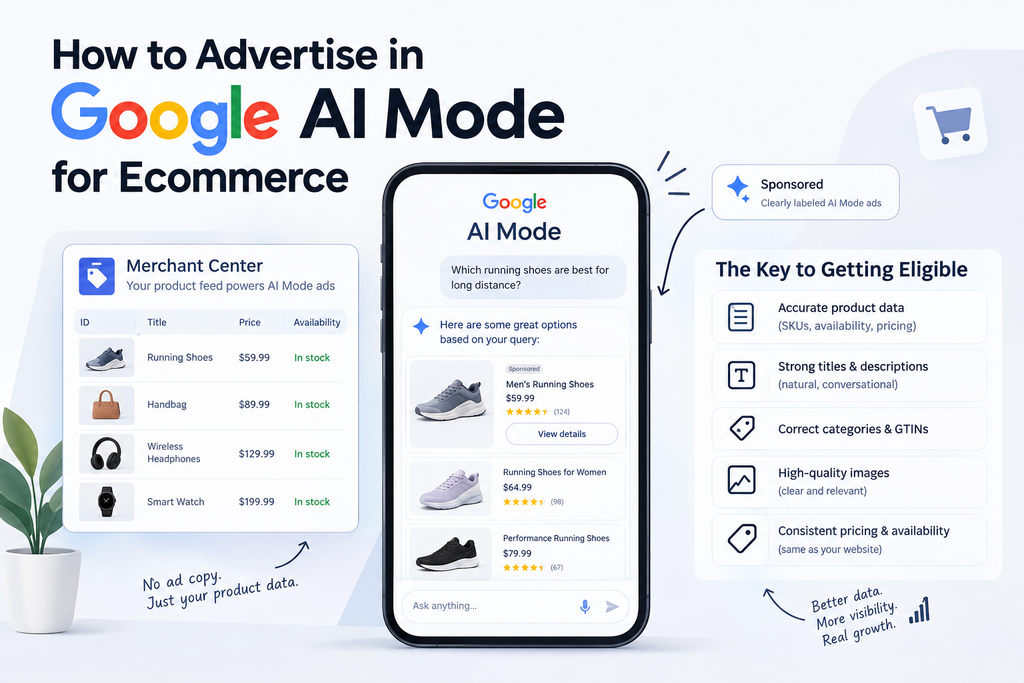
Here’s the thing most people get wrong when they ask how to advertise in Google AI Mode for ecommerce: they assume it works like a regular Shopping campaign, just inside a chat window. It doesn’t. You don’t write these ads. Google’s AI Mode ads are built directly from your Merchant Center feed, which means the paid media team isn’t the one holding the levers anymore — the product data team is. Understanding how Google AI Mode for ecommerce works starts with recognizing that product data now plays a much bigger role in how products can appear in AI-driven shopping experiences.
I’ll be upfront: I haven’t personally run campaigns inside AI Mode yet. It’s still an emerging space, and anyone claiming years of hands-on AI Mode ad management right now is either exaggerating or running very early access tests most brands don’t have. What I do have is years of hands-on work in Merchant Center and feed optimization — and that happens to be exactly the skill set that determines whether your products even get considered for these placements. So that’s the lens this guide comes from.
Why Merchant Center Feed Quality Is the Real Starting Point
Google has confirmed AI Mode passed a billion monthly users this year, and it’s pulling organic shopping recommendations based on what’s relevant to a query, with sponsored placements now being tested alongside those organic results, clearly labeled. None of that gets built from ad copy you write. It gets built from your product feed. For anyone learning how to advertise in Google AI Mode for ecommerce, the first priority should be understanding how product data influences visibility within these emerging shopping experiences.
Google AI Mode for ecommerce makes product-feed optimization more important because shoppers can discover products through broader, conversational questions rather than only traditional keyword searches.
For Google AI Mode for ecommerce, a well-optimized Merchant Center feed gives Google’s systems the product information they need to understand, match, and potentially surface your products for relevant shopping searches. That’s a fundamental shift. In traditional Shopping ads, a mediocre feed with decent bidding could still get some visibility. In AI Mode, the feed is the ad. If your data is thin, wrong, or inconsistent, there’s no clever bid strategy that fixes it.
Preparing for Google AI Mode for ecommerce therefore means paying close attention to the accuracy, completeness, and consistency of every important product attribute in your feed. From what I see constantly in feed audits, the same handful of issues keep products from being eligible or relevant in the first place:
- Incomplete product titles and descriptions
- Missing GTINs
- Incorrect product categorization
- Poor-quality images
- Mismatched pricing or availability between the feed and the live site
None of these are exotic problems. They’re basic data hygiene issues — but they’re the difference between a product Google can confidently surface and one it skips over.
A Feed Fix That Actually Moved the Needle
One example that stands out: a feed with missing GTINs and inconsistent product categorization. After correcting those attributes and cleaning up the underlying product data, the products became more consistently eligible for Shopping placements, and visibility improved along with more relevant traffic reaching the site. I’ll be honest that I don’t have exact sales figures to quote here — I’d rather leave a number out entirely than repeat one that was never properly measured. But the eligibility and traffic improvement was clear and consistent enough to trust.
That’s the kind of result that comes from getting fundamentals right, not from a growth hack.
The Order of Operations for Getting Feed-Ready
If you’re prepping a feed specifically with AI Mode eligibility in mind, the order matters. Jumping straight to images while your GTINs are still missing wastes effort. Here’s the sequence I’d follow: A practical Google AI Mode for ecommerce strategy should begin with reliable product information and gradually move toward optimization, monitoring, and refinement.
- Accurate product data first. Everything else depends on this being correct — SKUs, availability, pricing, all matching what’s live on the site.
- Strong titles and descriptions. Clear, specific, and written for how people actually search or ask conversational questions — not stuffed with keywords.
- Correct categories and GTINs. These directly affect whether Google can confidently match your product to a query.
- High-quality images. In a visual, conversational interface, a blurry or generic product photo is a real disadvantage.
- Consistent pricing and availability. Mismatches here erode trust fast, both with Google’s systems and with shoppers.
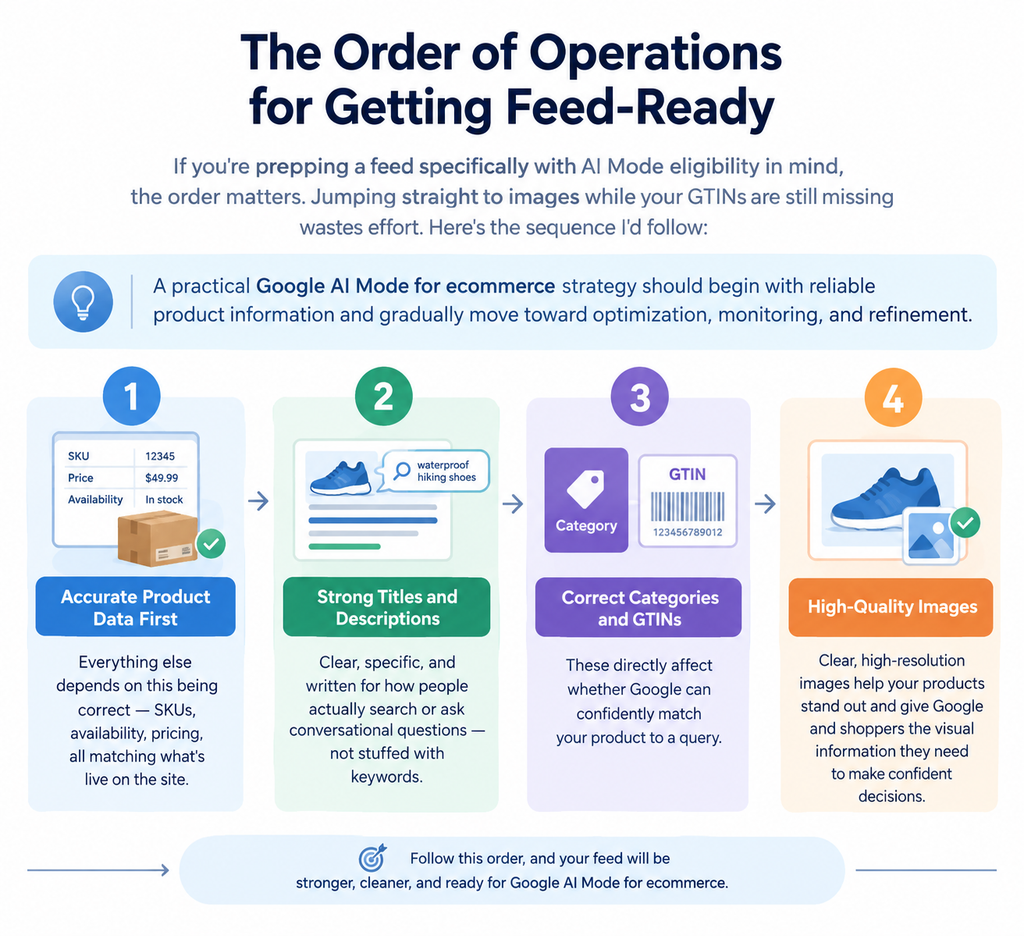
Once those basics are clean, the job shifts from “fix everything” to “monitor and refine” — watching product eligibility and performance data in Merchant Center and adjusting from there.
Google AI Mode for ecommerce – AI Mode Ads vs. Traditional Shopping Ads
| Aspect | Traditional Shopping Ads | Google AI Mode Ads |
| Ad copy | Written/selected by advertiser | Generated from Merchant Center feed |
| Primary lever | Bidding + campaign structure | Feed data quality and completeness |
| Placement context | Search results grid | Embedded in conversational, comparison-driven experience |
| What gets you eligible | Budget + relevance signals | Accurate, complete, consistent product attributes |
| Team that “owns” performance | Paid media | Product data / feed management, working with paid media |
The biggest mistake I’d flag here is treating AI Mode like a new flavor of the same Shopping playbook. It isn’t. AI-driven placements are still evolving, and chasing the newest format before your feed fundamentals are solid is putting effort in the wrong place. Get the data right first — the format will still be there once you do.
What to Do This Week
If you’re an ecommerce brand wanting to actually prepare for this rather than just read about it, here’s the concrete starting point. If you’re preparing for Google AI Mode for ecommerce, these steps provide a practical foundation before you start evaluating AI-driven shopping visibility.
- Run a complete Merchant Center feed audit. Go through titles, descriptions, GTINs, categories, images, pricing, and availability — all of it, not a spot check.
- Fix the highest-impact issues first. Missing GTINs and miscategorized products tend to cause the most eligibility problems.
- Give it a few weeks before judging results. Don’t expect immediate movement. Monitor eligibility, visibility, and performance data in Merchant Center as it comes in, and adjust from there.
That patience matters. Feed changes take time to propagate and for Google’s systems to reassess eligibility — rushing to declare something “not working” after a few days isn’t a fair test.
Before investing more time in Google AI Mode for ecommerce, make sure your Merchant Center feed gives Google accurate and useful information about every product you want to promote.
FAQs
If you’re considering Google AI Mode for ecommerce, these are some of the practical questions to address before changing your existing Shopping strategy.
Do I need to write ad copy for Google AI Mode ads?
No. AI Mode ads are generated from your Merchant Center product feed, not from advertiser-written ad copy — which is why feed quality matters more here than in traditional campaigns.
How long before feed fixes show results in AI Mode eligibility?
Expect to monitor over a few weeks rather than days. Give Google’s systems time to reprocess and reassess the updated feed data before judging impact. When preparing for Google AI Mode for ecommerce, the exact timing can vary, so monitoring the available Merchant Center data is more useful than expecting a fixed number of days.
Should I treat AI Mode the same as regular Google Shopping ads?
No — that’s one of the most common mistakes. Get your feed fundamentals (titles, GTINs, categories, images, pricing) solid first, since that’s what determines eligibility, rather than assuming the same Shopping playbook applies. The approach to Google AI Mode for ecommerce should therefore account for the differences in how product information and AI-driven shopping experiences work.
Conclusion: Key Takeaways
Advertising in Google AI Mode for ecommerce isn’t really an “ads” problem first — it’s a data problem. Getting this right comes down to .Success with Google AI Mode for ecommerce depends less on chasing a new ad format and more on building a product feed that is accurate, complete, and easy for Google’s systems to understand. For brands exploring Google AI Mode for ecommerce, the immediate opportunity is not to chase every new feature but to make sure their Merchant Center data is accurate and dependable.
- Understanding that AI Mode ads are built from your Merchant Center feed, not written ad copy
- Auditing and fixing the basics — titles, GTINs, categories, images, pricing, availability — before anything else
- Following a clear order of operations rather than jumping straight to the flashiest fix
- Giving feed changes a few weeks to show up in eligibility and performance data
- Avoiding the trap of treating this as “Shopping ads with extra steps”
For brands exploring Google AI Mode for ecommerce, the immediate opportunity is not to chase every new feature but to make sure their Merchant Center data is accurate and dependable.For ecommerce businesses looki
ng to improve their online visibility, working with the best digital marketer in Thrissur can help turn product data, SEO, and paid advertising into a more effective digital strategy. From Merchant Center feed optimization to Google Ads and search visibility, a focused approach can help local businesses reach the right audience and build stronger growth opportunities online. Getting your product data right today gives your ecommerce business a stronger foundation as Google AI Mode for ecommerce continues to evolve.